dacc-js
Decentralized Account Control (DAcc) on Blockchain networks





**dacc-js** is a library for implementing [Decentralized Account Control (DAcc)](./concept/design.mdx) on blockchain networks. It enables users and developers to [create secure encrypted](./concept/mechanical.mdx) **wallets** with **Web2 solution integration** that can be recovered using only a **password**, eliminating the need for complex seed phrases or private key management. The library operates in a completely **serverless architecture** without storing private keys on any servers or centralized systems, utilizing advanced encryption technology to ensure **full wallet ownership**, **exportability**, and **user privacy**.
#### Why Dacc-js
* **User-Centric Design**: Dacc-js is built with the user in mind, enabling easy integration with Web2 solutions and simplifying wallet creation and recovery processes.
* **Flexibility and Control**: Users have complete control over their wallets, with the ability to recover them using just a password, making it a versatile solution for various use cases.
* **Enhanced Security**: By eliminating the need for seed phrases and central key storage, Dacc-js significantly reduces the attack surface for potential threats.
* **Free and Open Source**: Completely free to use with an open-source codebase, providing full transparency for developers.
#### Use Cases
* **Decentralized Applications (dApps)**: Integrate Dacc-js into dApps to provide users with a seamless and secure wallet experience.
* **Web3 Onboarding**: Simplify the onboarding process for new users entering the Web3 space.
* **Password-Based Wallets**: Create wallets that can be easily recovered with a password, enhancing user convenience without compromising security.
### Features
* **Password-based Wallet Encryption & Recovery**: Create or recover your wallet using only a password - no need to store private keys directly.
* **Self-Ownership Management**: Private keys are not stored centrally, they are decentralized, decryptable and private with a password for recovery, ensuring complete self-ownership.
* **Serverless by Design**: Fully client/server-side operation, no backend, no API, no database costs, use blockchain for data memory and transparency.
* **Built-in Transaction Functions**: Pre-built comprehensive functions designed to perfectly address all use cases with extreme ease and convenience. Easy transaction handling and simple to use, reduce development time and focus on building your app efficiently.
* **Seamless Transaction Interaction**: Easy integration with many libraries, supports all EVM types and works seamlessly with [ethers](https://docs.ethers.org/v5/), [viem](https://viem.sh/) and other blockchain development tools with direct account connection.
### Installation
install `dacc-js` as a dependency in project.
:::note
Before installing `dacc-js`, it is recommended to first install [Node.js v22+](https://nodejs.org/en/download/) on your system to make sure it is installed correctly.
:::
> To use CLI Commands, you'll need to install it globally `-g` is a [global](https://docs.npmjs.com/cli/v9/commands/npm-install#global-installation) package installation. > *After installing, you can call `dacc` from your terminal using the available commands* :::code-group ```bash [npm] npm i dacc-js ``` ```bash [bun] bun add dacc-js ``` ```bash [yarn] yarn add dacc-js ``` ```bash [pnpm] pnpm add dacc-js ``` ::: ### Quick Start ::::steps #### Install First, we will install `dacc-js` as a dependency in our project. :::code-group ```bash [npm] npm i dacc-js ``` ```bash [bun] bun add dacc-js ``` ```bash [yarn] yarn add dacc-js ``` ```bash [pnpm] pnpm add dacc-js ``` ::: #### Build Create a script file or function to create your Dacc wallet. ```ts [./index.ts] import { createDaccWallet } from "dacc-js"; const wallet = await createDaccWallet({ passwordSecretkey: 'my+Password#123...', }); console.log("wallet:", wallet); // {address, daccPublickey} console.log("wallet address:", wallet?.address); // 0x123address... (recall = address) console.log("wallet daccPublickey:", wallet?.daccPublickey); // daccPublickey_0x123_XxX... (keep = id) ``` #### Run The next step is to run the front-end or script function. ```ts // run to file bun run index.ts // Done! You will get a sample result. wallet: { address: "0x123address...", daccPublickey: "daccPublickey_0x123_XxX...", } // Recall - address for sending/receiving tokens and assets on blockchain wallet address: 0x123address... // Keep - encrypted with password, acts as your ID // must be kept safe. Do not lose it. wallet daccPublickey: daccPublickey_0x123_XxX... ``` :::: ### Donate Support core development team and help to the project growth. ```bash [EVM Compatible] 0x6A74308F267c07556ED170025AE2D1753F747E20 ``` ## Privacy Policy & Terms of Service ### Disclaimer **Dacc-js is open-source software provided "as is" without warranty of any kind. By using this software, you acknowledge and agree that** #### Use at Your Own Risk * You use Dacc-js entirely at your own risk and responsibility * The developers and contributors are not liable for any damages, losses, or issues arising from your use of this software * This includes but is not limited to financial losses, security breaches, or any other consequences #### No Warranty * Dacc-js is provided without warranties of merchantability, fitness for a particular purpose, or non-infringement * We do not guarantee the software will meet your requirements or operate without interruption * The software may contain bugs, errors, or security vulnerabilities #### Open Source Nature * Dacc-js is open-source software licensed under (GNU General Public License v3.0) * You are free to inspect, modify, and distribute the code according to the license terms * Community contributions are welcome but not guaranteed to be reviewed or accepted ### Privacy Policy #### Data Collection * Dacc-js operates as a client-side library * We do not collect, store, or transmit your personal data or private keys * All wallet operations are performed locally on your device #### Third-Party Services * When interacting with blockchain networks, your transactions are public on the respective blockchains * We are not responsible for the privacy practices of blockchain networks or other third-party services you interact with #### Local Storage * The library does not collect or store any data locally * No personal information, preferences, or session data is stored on your device * All operations are performed without persistent data storage ### Terms of Service #### Permitted Use * Use Dacc-js for lawful purposes only * Do not use the software for illegal activities, fraud, or to harm others * Respect applicable laws and regulations in your jurisdiction #### Intellectual Property * Dacc-js and its documentation are subject to copyright and other intellectual property rights * You may use, modify, and distribute the software according to the open-source license #### Limitation of Liability * In no event shall the developers, contributors, or maintainers be liable for any direct, indirect, incidental, special, or consequential damages * This limitation applies regardless of the theory of liability (contract, tort, etc.) *** *By continuing to use Dacc-js, you acknowledge that you have read, understood, and agree to be bound by these terms.* ## allowDaccWallet \[A function Allow a Wallet access and Private key] The `allowDaccWallet` function is designed to decrypt an encrypted wallet and retrieve its credentials (address and private key) for use within the `dacc-js` ecosystem. This function allows users to access their wallet by **daccPublickey** encrypted with their password. ### Import ```ts import { allowDaccWallet } from 'dacc-js'; ``` ### Usage ```ts import { allowDaccWallet } from 'dacc-js'; const allow = await allowDaccWallet({ daccPublickey: 'daccPublickey_0x123_XxX...', passwordSecretkey: 'my+Password#123....', }); console.log("allow:", allow); // {address, privateKey} console.log("allow address:", allow?.address); // 0x123address... (recall) console.log("allow privateKey:", allow?.privateKey); // 0xprivatekey... (secret) ``` #### Arguments | Parameter | Type | Description | | :---------------------- | :------------ | :--------------------------------------------------------------------------------------------------------------------------------------------------- | | **`daccPublickey`** | `string` | Conditional: The encrypted wallet data to lookup address from `createDaccWallet`. | | **`address`** | `0x${string}` | Conditional: Wallet address to lookup daccPublickey on-chain (`createDaccWallet` in `publicEncryption: true` Mode can use instead of daccPublickey). | | **`passwordSecretkey`** | `string` | The user's password used as the key for encryption. | ### Return Value The response result is an object containing. `{address, privateKey}`. ### Parameters #### daccPublickey (conditional) * **Type:** `string` The user's encrypted public key to address. ```ts const allow = await allowDaccWallet({ daccPublickey: 'daccPublickey_0x123_XxX...', // [!code focus] passwordSecretkey: 'my+Password#123...' }); ``` #### address (conditional) * **Type:** `0x${string}` Wallet address to lookup daccPublickey **on-chain** [createDaccWallet](/functions/createDaccWallet#publicencryption-optional). :::note When using `address`, the function will call [readDaccWallet](/functions/readDaccWallet) to fetch the encrypted public key from on-chain storage. You don't need to provide `daccPublickey` when using this method. ::: ```ts const allow = await allowDaccWallet({ daccPublickey: 'daccPublickey_0x123_XxX...', // [!code --] address: '0x123address...', // [!code focus] passwordSecretkey: 'my+Password#123...' }); ``` #### passwordSecretkey * **Type:** `string` Your password secret is matched with the encryption. :::info Do not reveal your password to anyone. ::: ```ts const allow = await allowDaccWallet({ daccPublickey: 'daccPublickey_0x123_XxX...', passwordSecretkey: 'my+Password#123...' // [!code focus] }); ``` ## createDaccWallet \[A function to create a Wallet] The `createDaccWallet` function is the cornerstone of `dacc-js`. Its primary role is to **generate a new wallet**, encrypt its Private Key using the user's password, and return the wallet's public address along with the encrypted key for secure storage. ### Import ```ts import { createDaccWallet } from 'dacc-js'; ``` ### Usage ```ts import { createDaccWallet } from 'dacc-js'; const wallet = await createDaccWallet({ passwordSecretkey: 'my+Password#123..', // publicEncryption: true, // dataStorageNetwork: 'opSepolia', // pkWalletForSaveData: 'ENV.0XPRIVATEKEY_GAS..', // minPassword: 24 }); console.log("wallet:", wallet); // {address, daccPublickey} console.log("wallet address:", wallet?.address); // 0x123address... (recall) console.log("wallet daccPublickey:", wallet?.daccPublickey); // daccPublickey_XxX... (keep) ``` #### Arguments | Parameter | Type | Description | | :------------------------------- | :------------------------------------------- | :------------------------------------------------------------------------------------------------------------------------------------------------------------ | | **`passwordSecretkey`** | `string` | The user's password used as the key for encryption. | | **`publicEncryption`** | `boolean` | Enable or disable public encryption (default: false). *default: false, no retrospective recording will be performed with `readDaccWallet`*. | | **`dataStorageNetwork`** | `string` (keyof) - SELECT or `customChain{}` | The blockchain network (e.g., 'opSepolia') to store the encrypted data is on-chain. | | **`pkWalletForSaveData`** | `0x${string}` | The **Private Key of an existing wallet** used to pay for gas when submitting the encrypted data to the blockchain (required if `dataStorageNetwork` is set). | | **`minPassword`, `maxPassword`** | `number` | Optional settings to define the minimum/maximum password length (defaults: 6 and 64). | ### Return Value The response result is an object containing. `{address, daccPublickey}` ### Parameters #### passwordSecretkey * **Type:** `string` You set a password. :::info Your password should be long and contain uppercase letters and special characters, including numbers. ::: ```ts const wallet = await createDaccWallet({ passwordSecretkey: 'myPassword#123...', // [!code focus] }); ``` #### publicEncryption (optional) * **Type:** `boolean` * **Default:** `false` Configure the public encryption mode setting. :::warning Enabling this mode carries inherent risks that you accept. **Please set the strongest possible password for your wallet**. ::: ```ts const wallet = await createDaccWallet({ passwordSecretkey: 'my+Password#123...', publicEncryption: true // [!code focus] default = false dataStorageNetwork: 'opSepolia', // [!code ++] required for this mode pkWalletForSaveData: 'ENV.0XPRIVATEKEY_GAS...' // [!code ++] required for this mode }); ``` #### dataStorageNetwork (optional) * **Type:** `string` (keyof) | `customChain{ chain: Chain, contract: 0x${string}}` Select supported networks. :::note You can set [publicEncryption](#publicencryption-optional) = **true** to enables this mode ([readDaccWallet](/functions/readDaccWallet) will work). ::: ::::note When using [customChain](/concept/mechanical#custom-networks) instead of specifying a network name: * Ensure the defined `chain` has correct configuration (RPC URL, Chain ID etc..) * The `contract` address must be a Smart Contract already deployed on that chain :::details[Custom Chain Network] ```ts import { defineChain } from "viem"; const myCustomChain = defineChain({ id: 123456, name: "My Custom Chain", network: "myCustomChain", nativeCurrency: { name: "ETH", symbol: "ETH", decimals: 18 }, rpcUrls: { default: { http: ["https://rpc-example.com"] } }, blockExplorers: { default: { name: 'Explorer', url: 'https://explorer-example.com' }, }, }); ``` ::: :::: ```ts const wallet = await createDaccWallet({ passwordSecretkey: 'myPassword#123...', publicEncryption: true, // [!code ++] required for this mode dataStorageNetwork: 'opSepolia', // [!code focus] // dataStorageNetwork: { // customChain: { // [!code hl] For Custom Chain Network // chain: myCustomChain, // [!code hl] // contract: "0xYourDeployDaccWalletStorageOnChainAddress..", [!code hl] // }, // [!code hl] // }, pkWalletForSaveData: 'ENV.0XPRIVATEKEY_GAS...', // [!code ++] required for this mode }); ``` #### pkWalletForSaveData (optional) * **Type:** `0x${string}` Specify a private key for the wallet creation to save the public key encryption data retrospectively. :::info The wallet on that network must have enough gas coins to complete the transaction. `dataStorageNetwork` ::: :::warning The desired wallet private key should be used with caution, never disclosed, stored securely in a transaction app set to `.env` file. ::: ```ts const wallet = await createDaccWallet({ passwordSecretkey: 'myPassword#123...', dataStorageNetwork: 'opSepolia', pkWalletForSaveData: 'ENV.0XPRIVATEKEY_GAS..', // [!code focus] ENV.SECRET }); ``` #### minPassword & maxPassword (optional) * **Type:** `number` * **Default:** `12` (min), `120` (max) Configure the password length setting. ```ts const wallet = await createDaccWallet({ passwordSecretkey: 'myPassword#123', // publicEncryption: true, // dataStorageNetwork: 'opSepolia', // pkWalletForSaveData: '0xprivatekeyGas..', minPassword: 24 // [!code focus] default = 12 maxPassword: 240 // [!code focus] default = 120 }); ``` ## readDaccWallet \[A function Search a Wallet information.] The `readDaccWallet` function is designed to retrieve information about a specific wallet within the `dacc-js` library. :::success The Dacc wallet must be created with [publicEncryption: **true**](/functions/createDaccWallet/#publicencryption-optional) to store data on the blockchain. ::: :::warning Enabling this mode carries inherent risks that you accept. **Please set the strongest possible password for your wallet**. ::: ### Import ```ts import { readDaccWallet } from 'dacc-js'; ``` ### Usage ```ts import { readDaccWallet } from 'dacc-js'; const info = await readDaccWallet({ address: "0x1234abcd...", // dataStorageNetwork: "opSepolia", // result: "daccPublickey" }); console.log("info:", info); // { dataStorageNetwork: "opSepolia", daccPublickey: "daccPublickey_0x123_XxX..." } ``` ```ts const info = await readDaccWallet({ address: "0x1234abcd...", dataStorageNetwork: "opSepolia", result: "daccPublickey" }); console.log("info:", info); // { daccPublickey: "daccPublickey_0x123_XxX..." } ``` Find `daccPublickey` by **address** ```ts const info = await readDaccWallet({ address: "0x1234abcd..." }); console.log("info:", info); // { dataStorageNetwork: "opSepolia", daccPublickey: "daccPublickey_0x123_XxX..." } ``` Find `address` by **daccPublickey** ```ts const info = await readDaccWallet({ daccPublickey: "daccPublickey_0x123_XxX..." }); console.log("info:", info); // { dataStorageNetwork: "opSepolia", address: "0x1234abcd..." } ``` *Explicitly specifying options will speed up searches.* #### Arguments | Parameter | Type | Description | | :----------------------- | :-------------------------------------- | :----------------------------------------------------- | | **`daccPublickey`** | `string` | Encrypted public key to find associated address | | **`address`** | `0x${string}` | Wallet address to find associated encrypted public key | | **`dataStorageNetwork`** | `string \| "all"` | Network to query. Defaults to `"all"` | | **`result`** | `"address" \| "daccPublickey" \| "all"` | Specify return data type | *Either `address` or `daccPublickey` must be provided.* ### Return Values The return value depends on the `result` parameter and `dataStorageNetwork` setting: #### When querying all networks (`dataStorageNetwork: "all"`) ```ts // Returns with network information { dataStorageNetwork: string; address?: `0x${string}`; daccPublickey?: string; } ``` #### When querying specific network ```ts // Returns without network information { address?: `0x${string}`; daccPublickey?: string; } ``` ### Parameters #### daccPublickey (conditional) * **Type:** `string` Encrypted public key of the wallet to look up. ```ts const info = await readDaccWallet({ daccPublickey: "daccPublickey_0x123_XxX..." // [!code focus] }); ``` #### address (conditional) * **Type:** `0x${string}` address of the wallet to look up. ```ts const info = await readDaccWallet({ address: "0x1234abcd...", // [!code focus] }); ``` #### dataStorageNetwork (optional) * **Type:** `string` (keyof) * **Default:** `"all"` Specify which blockchain network to query. ::::note When using [customChain](/concept/mechanical#custom-networks), it must be specified **dataStorageNetwork** and match the configuration used during [createDaccWallet](/functions/createDaccWallet#datastoragenetwork): * Ensure the defined `chain` has correct configuration (RPC URL, Chain ID etc..) * The `contract` address must be a Smart Contract already deployed on that chain :::details[Custom Chain Network] ```ts import { defineChain } from "viem"; const myCustomChain = defineChain({ id: 123456, name: "My Custom Chain", network: "myCustomChain", nativeCurrency: { name: "ETH", symbol: "ETH", decimals: 18 }, rpcUrls: { default: { http: ["https://rpc-example.com"] } }, blockExplorers: { default: { name: 'Explorer', url: 'https://explorer-example.com' }, }, }); ``` ::: :::: ```ts const info = await readDaccWallet({ daccPublickey: "daccPublickey_0x123_XxX...", // address: "0x1234abcd...", dataStorageNetwork: "opSepolia" // [!code focus] // dataStorageNetwork: { // customChain: { // [!code hl] For Custom Chain Network // chain: myCustomChain, // [!code hl] // contract: "0xYourDeployDaccWalletStorageOnChainAddress..", [!code hl] // }, // [!code hl] // }, }); ``` *Specifying a network will make searches more precise and faster.* #### result (optional) * **Type:** `string` (keyof) * **Default:** `"all"` result type to return. ```ts const info = await readDaccWallet({ daccPublickey: "daccPublickey_0x123_XxX...", // address: "0x1234abcd...", dataStorageNetwork: "all", result: "daccPublickey" // [!code focus] }); ``` ## Design concept \[Core design and workflow of Dacc-js] ### Overview 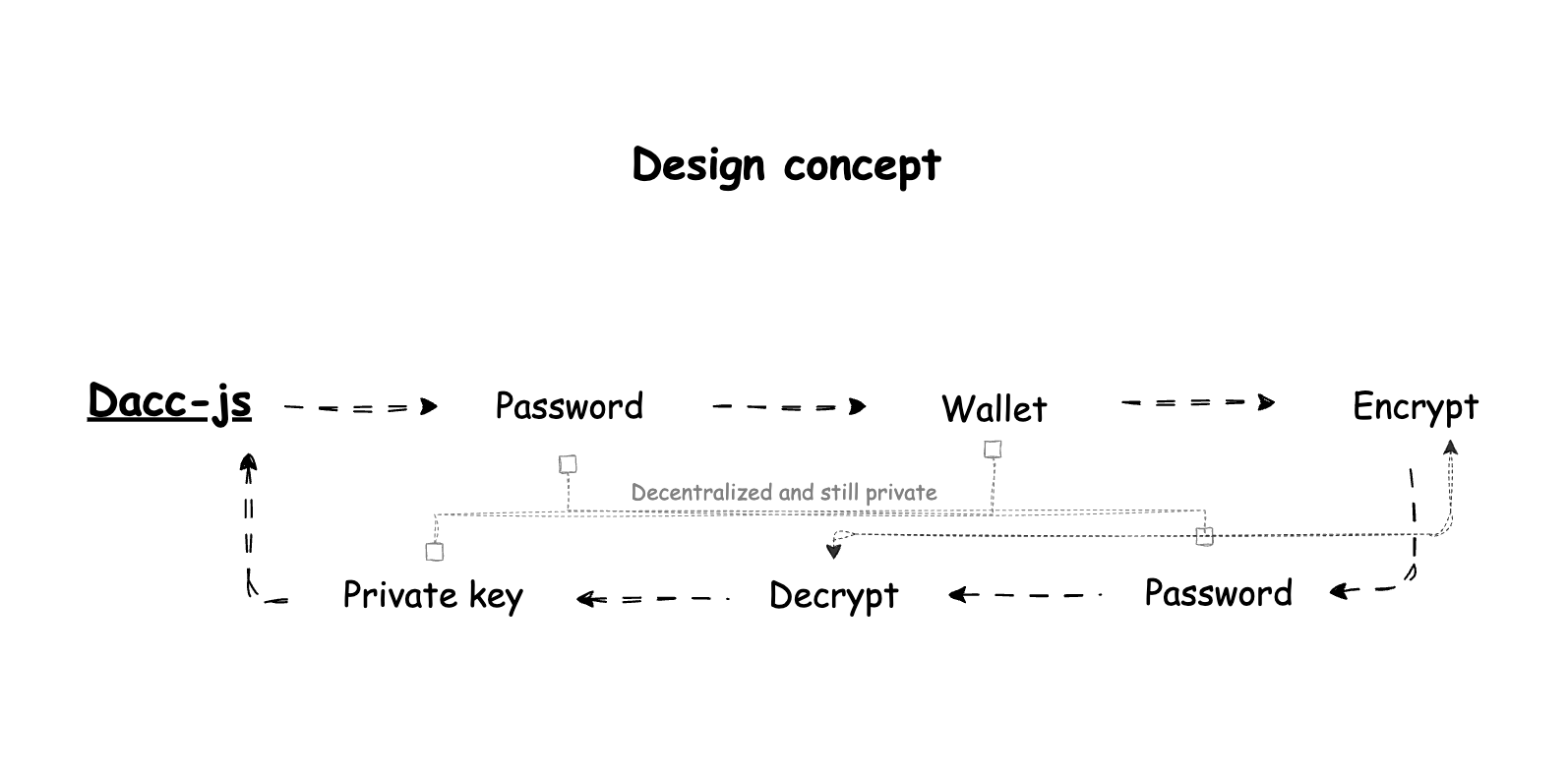 Understanding the core design and workflow of Dacc-js helps you use it effectively and securely. Dacc-js implements a **Decentralized and still private** approach to wallet management. The key insight is that you can store encrypted data on public blockchains or private storage while maintaining complete privacy, since only you have the decryption key. ### Design Principles #### Ownership You have complete control over your keys without having to trust any third parties or servers. Dacc-js will never have access to your unencrypted private keys. #### Privacy No need to handle private keys directly, your private information remains private through encryption. #### Simplicity Complex cryptography is hidden behind simple function calls. #### Flexibility Choose between private local storage, DB database, blockchain storage, or other. #### Security Uses proven cryptographic standards and best practices. ## Mechanical system \[Mechanical system and lifecycle of a wallet] ### Overview 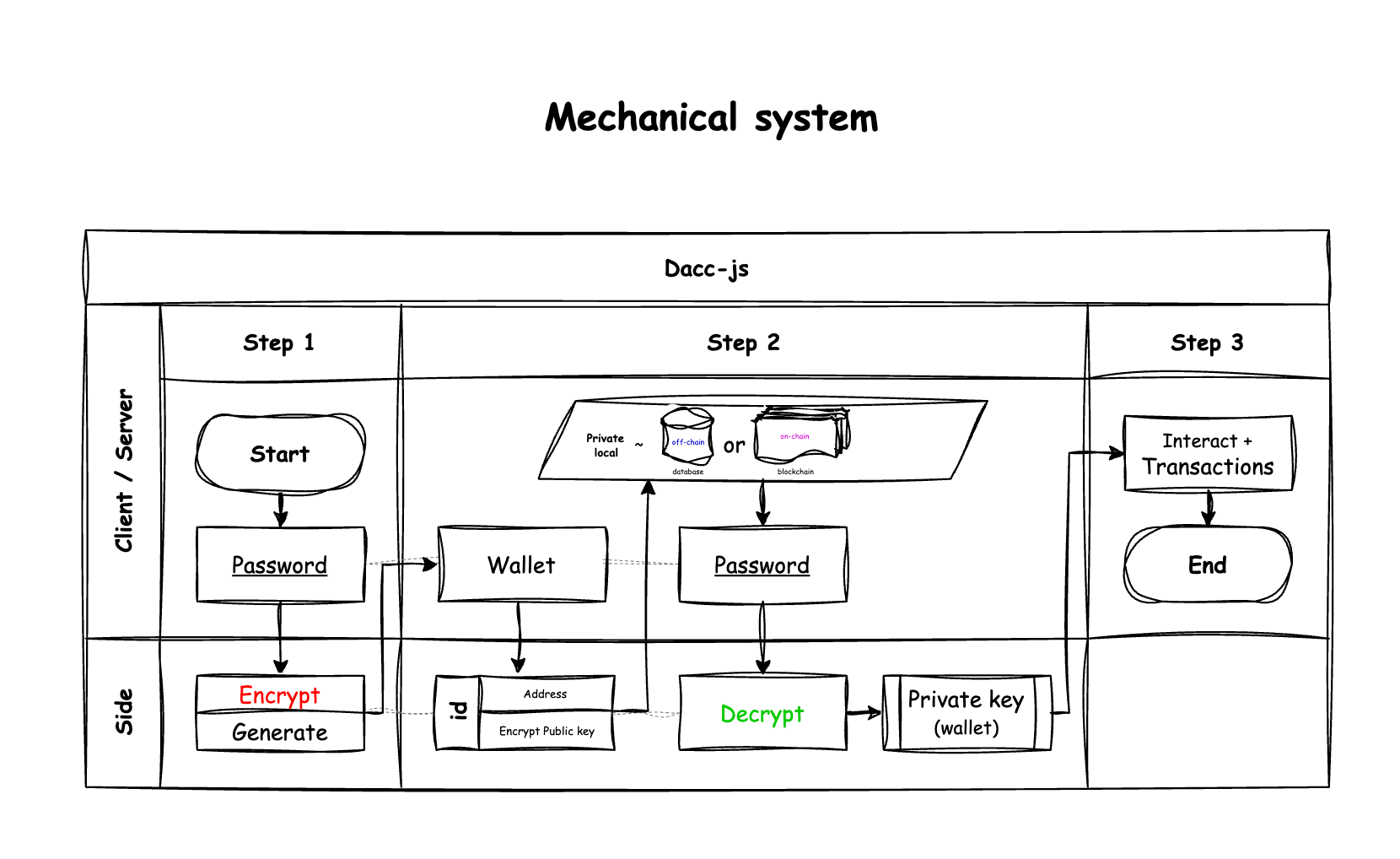 The **Mechanical System** in `dacc-js` defines the complete lifecycle of a wallet from creation, encryption, and storage, to recovery, keeping your private data safe and under your control. (referring to the user's device or trusted execution environment). ### Wallet Creation Process #### Wallet Creation Flow ```typescript Password → Generate Wallet → Encrypt Private Key → Store (Optional: Private/Public) ``` 1. **Password Validation**: Validates password length (12-120 characters by default) 2. **Generate Wallet**: Creates new private key using `generatePrivateKey()` 3. **Encrypt Private Key**: Uses Argon2ID + AES-GCM encryption 4. **Storage Mode**: Choose between private (local) or public (blockchain) storage #### Wallet Recovery Flow ```typescript Encrypted Data + Password → Decrypt → Private Key → Wallet Access ``` 1. **Retrieve encrypted data**: From your storage or blockchain 2. **User provides password**: Same password used for encryption 3. **Decrypt private key**: Reverses the encryption process 4. **Restore wallet**: Full access to your wallet and funds ### Security Architecture #### Encryption Process ```typescript // Generate random number const salt = crypto.getRandomValues(new Uint8Array(16)); const iv = crypto.getRandomValues(new Uint8Array(12)); // Argon2ID key derivation const key = sodium.crypto_pwhash( 32, passwordSecretkey, salt, sodium.crypto_pwhash_OPSLIMIT_MODERATE, sodium.crypto_pwhash_MEMLIMIT_MODERATE, sodium.crypto_pwhash_ALG_ARGON2ID13 ); // AES-GCM encryption const encrypted = await crypto.subtle.encrypt( { name: "AES-GCM", iv }, key, hexToBytes(privateKey) ); ``` #### Security Features * **Argon2ID**: Memory-hard password hashing, resistant to GPU/ASIC attacks * **AES-GCM**: Authenticated encryption with built-in integrity protection * **Random Salt & IV**: Each encryption is cryptographically unique * **Base58 Encoding**: Human-readable format with address prefix **Pros:** * Automatic public encryption on blockchain (optional) * Accessible from anywhere * Permanent storage **Cons:** * Requires transaction fees * Need existing wallet for gas * Public (but encrypted) storage ### Threat Model #### What Dacc-js Protects Against * ✅ **Data breaches**: Encrypted data is useless without passwords * ✅ **Network interception**: Only encrypted data is transmitted * ✅ **Server compromises**: No servers store your secrets * ✅ **Malicious storage providers**: They only see encrypted data #### What You Must Protect Against * ❌ **Password compromise**: Use strong, unique passwords * ❌ **Device compromise**: Keep your device secure * ❌ **Social engineering**: Never share passwords or private keys * ❌ **Physical access**: Secure your storage locations * ❌ **App access**: Make sure any application you use cannot store or view your password. ### Privacy Model #### What Private * ✅ Your private key (never stored or transmitted) * ✅ Your decrypted private key (client-side only) * ✅ Your wallet contents and transactions * ✅ The connection between your identity and wallet #### What Public (When Using Blockchain Storage) * ❌ The fact that an encrypted wallet exists * ❌ The wallet's public address * ❌ When the wallet was created * ❌ The encrypted data (but it's meaningless without your password) Even if someone gains access to, They still cannot access your wallet without your password. ### Supported Networks Dacc-js supports multiple blockchain networks for storage: #### Testnet | Network | ChainId | Smart Contract | Type | | ------------- | -------- | ---------------------------------------------------------------------------------------------------------------------------------------------------------------------------------------------------- | ------- | | `sepolia` | 11155111 | [Proxy](https://eth-sepolia.blockscout.com/address/0x79f5E87D0bFd7610273899424749A0663462d9fd), [Storage](https://eth-sepolia.blockscout.com/address/0x8e984db8Fa914b8C4511CD1D6DfE987A3E6eD64e) | Testnet | | `hoodi` | 560048 | [Proxy](https://eth-hoodi.blockscout.com/address/0x75712faa1a0F38daC2CafdF8693364bEeB91ab27), [Storage](https://eth-hoodi.blockscout.com/address/0x289EB201A76010a7B00B820316a69612E71c76C7) | Testnet | | `opSepolia` | 11155420 | [Proxy](https://testnet-explorer.optimism.io/address/0x75712faa1a0F38daC2CafdF8693364bEeB91ab27), [Storage](https://testnet-explorer.optimism.io/address/0x289EB201A76010a7B00B820316a69612E71c76C7) | Testnet | | `baseSepolia` | 84532 | [Proxy](https://base-sepolia.blockscout.com/address/0x75712faa1a0F38daC2CafdF8693364bEeB91ab27), [Storage](https://base-sepolia.blockscout.com/address/0x289EB201A76010a7B00B820316a69612E71c76C7) | Testnet | | `bnbTestnet` | 97 | [Proxy](https://testnet.bscscan.com/address/0x75712faa1a0F38daC2CafdF8693364bEeB91ab27), [Storage](https://testnet.bscscan.com/address/0x289eb201a76010a7b00b820316a69612e71c76c7) | Testnet | #### Mainnet | Network | ChainId | Smart Contract | Type | | ---------- | ------- | ------------------------------------------------------------------------------------------------------------------------------------------------------------------------------------ | ------- | | `ethereum` | 1 | [Proxy](https://etherscan.io/address/0x75712faa1a0f38dac2cafdf8693364beeb91ab27), [Storage](https://etherscan.io/address/0x289eb201a76010a7b00b820316a69612e71c76c7) | Mainnet | | `optimism` | 10 | [Proxy](https://explorer.optimism.io/address/0x75712faa1a0f38dac2cafdf8693364beeb91ab27), [Storage](https://explorer.optimism.io/address/0x289eb201a76010a7b00b820316a69612e71c76c7) | Mainnet | | `base` | 8453 | [Proxy](https://basescan.org/address/0x75712faa1a0f38dac2cafdf8693364beeb91ab27), [Storage](https://basescan.org/address/0x289eb201a76010a7b00b820316a69612e71c76c7) | Mainnet | | `bnb` | 56 | [Proxy](https://bscscan.com/address/0x75712faa1a0f38dac2cafdf8693364beeb91ab27), [Storage](https://bscscan.com/address/0x289eb201a76010a7b00b820316a69612e71c76c7) | Mainnet | *These networks are actively maintained and updated.* #### Custom Networks You can define custom blockchain networks by providing the necessary chain configuration when using Dacc-js functions. This allows you to use Dacc-js with any EVM-compatible blockchain that suits your requirements. *[Smart Contract](https://github.com/thefactlab-org/dacc-js/tree/main/smartcontract)* :::code-group ```ts [Network.ts] import { defineChain } from "viem"; const myCustomChain = defineChain({ id: 123456, name: "My Custom Chain", network: "myCustomChain", nativeCurrency: { name: "ETH", symbol: "ETH", decimals: 18 }, rpcUrls: { default: { http: ["https://rpc-example.com"] } }, blockExplorers: { default: { name: 'Explorer', url: 'https://explorer-example.com' }, }, }); ``` ```solidity [Contract.sol] // SPDX-License-Identifier: MIT // Non-Proxy - Simple Smart Contract for Dacc Wallet Storage pragma solidity ^0.8.30; contract DaccWalletStorage { mapping(address => string) private daccPublickeyOf; mapping(string => address) private addressOf; mapping(address => bool) private isCreated; event CreatedDaccWallet(address walletAddress, string daccPublickey); function createDaccWallet(address walletAddress, string memory daccPublickey) external { require(!isCreated[walletAddress], "Already create"); require(addressOf[daccPublickey] == address(0), "daccPublickey already used"); daccPublickeyOf[walletAddress] = daccPublickey; addressOf[daccPublickey] = walletAddress; isCreated[walletAddress] = true; emit CreatedDaccWallet(walletAddress, daccPublickey); } function getPublickeyByAddress(address walletAddress) external view returns (string memory) { return daccPublickeyOf[walletAddress]; } function getAddressByPublickey(string memory daccPublickey) external view returns (address) { return addressOf[daccPublickey]; } } ``` ::: ### Best Practices #### Password Security * Use a unique password for each wallet * Minimum 12+ characters with mixed case, numbers, symbols * Use separate wallets for different use cases * Never store passwords with encrypted keys * Always test wallet recovery immediately after creation #### Development * Always disclose your open-source to users * Implement proper error handling * Use secure random number generation * Never log sensitive information The design of Dacc-js ensures that you maintain complete control over your assets while benefiting from the convenience and backup capabilities of decentralized networks. ## Solve problem \[The primary goal is to resolve fundamental] ### Overview 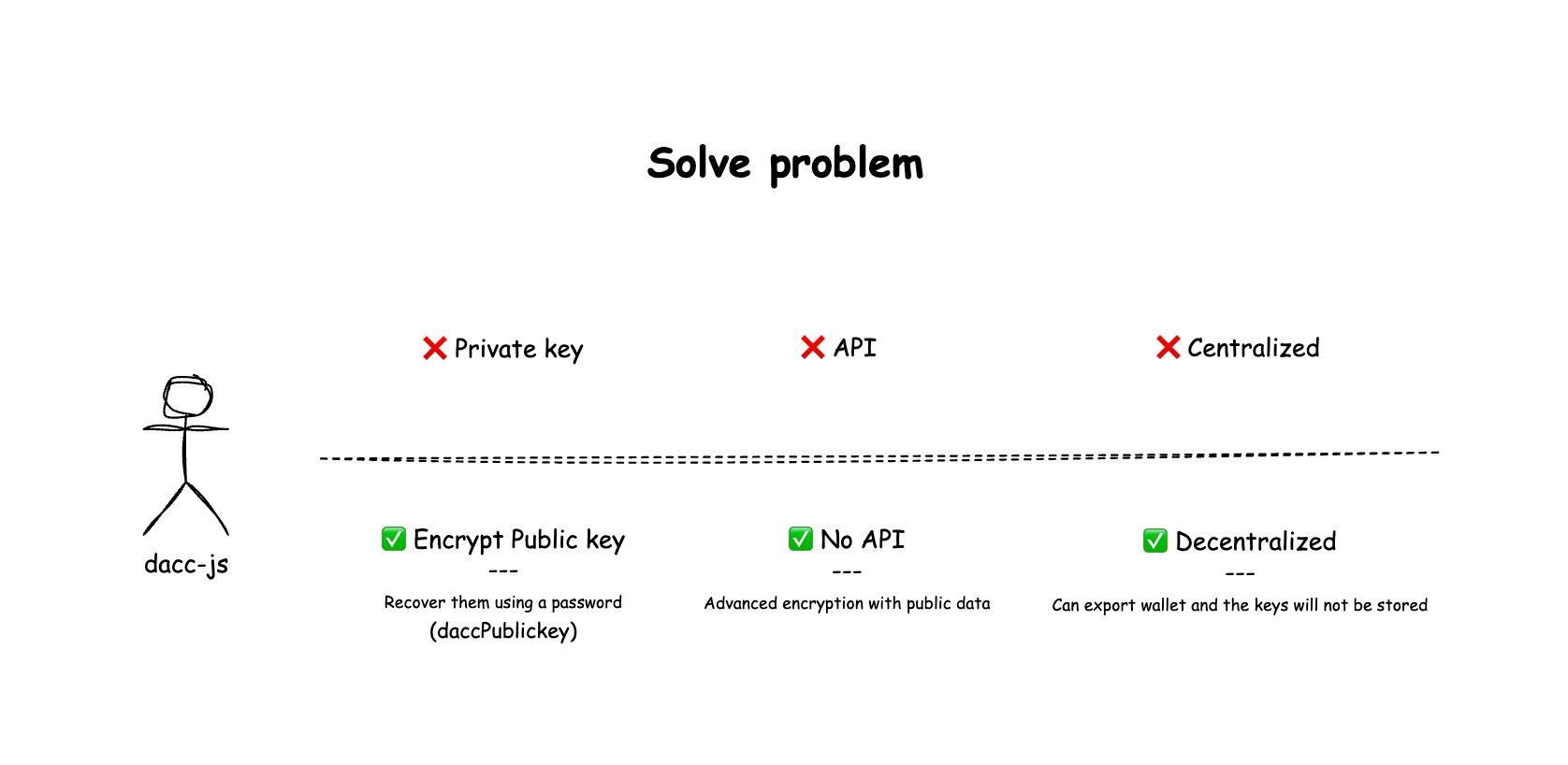 This diagram illustrates the **Core Philosophy** driving the design of the **`dacc-js`** library. The primary goal is to resolve fundamental issues often found in traditional Web3 wallets for **Web2 solutions** and services: **reliance on intermediaries** and **data centralization**. ### Solved model `dacc-js` is engineered to eliminate the limitations and security concerns arising from dependency on external services when accessing your account directly. | Type | The Old Problem | The Dacc-js (Solution) | | :------ | :------------------------------------------------------------------------ | :----------------------------------------------------------------------------------------------- | | Key | ❌ Private Key | ✅ Encrypt Public key (daccPublickey) | | Service | ❌ API Dependent | ✅ No API Dependency | | Data | ❌ Centralized | ✅ Decentralized | ### Key #### Problem: Private Key Traditional wallets require users to directly handle raw private keys, creating significant security and usability challenges: * **Complex Format:** Managing long hexadecimal strings (64 characters) is error-prone and intimidating for users. * **Storage Risk:** Private keys stored in plain text files or screenshots are vulnerable to theft or accidental exposure. * **Recovery Difficulty:** Lost private keys mean permanent loss of assets with no recovery mechanism. * **Human Error:** Easy to copy incorrectly, share accidentally, or store insecurely. #### Solution: Dacc-js - Encrypt Public key (daccPublickey) `dacc-js` transforms wallet security by using encrypted public keys instead of exposing private keys, while enabling password-based recovery: * **Familiar Interface:** Users work with passwords they already understand and trust for key recovery. * **Strong Encryption:** Private keys are never exposed - only encrypted public keys are handled. * **Password Recovery:** Private keys can be recovered using your password without storing the actual private key. * **Better UX:** No need to manage complex hexadecimal strings or worry about private key exposure. > **Enhanced Security:** Your private key can be recovered from your password and encrypted public key, but the private key itself is never stored or transmitted. Even `dacc-js` cannot access your private keys without your password. ### Service #### Problem: API Dependent Most wallet services often rely on a specific provider's API for sending commands, checking status, or even partial key management: * **Single Point of Failure (SPOF):** If the API goes down, the service is interrupted. * **Censorship Risk:** The service provider can potentially block or restrict your access. #### Solution: Dacc-js - No API Dependency `dacc-js` is built to integrate directly with robust, standard Web3 libraries like **`ethers`** and **`viem`**, as well as other developer tools. > **By utilizing:** these libraries all transactions are handled **Peer-to-Peer** or by directly connecting to a blockchain node. This means you are **permissionless** and do not require authorization from any intermediary to use your wallet. *** ### Data #### Problem: Centralized In a centralized system, critical data like Private Keys might be stored on a company's servers (even if claimed to be encrypted). This introduces risks: * **Data Breach:** If the server is compromised, stored Private Keys are at risk of leakage. * **Lack of Control:** You do not have absolute, sovereign control over your keys. #### Solution: Dacc-js - Decentralized `dacc-js` adheres strictly to decentralized principles: * **No Key Storage:** The system **does not store** your unencrypted private keys on any server. * **Export Capability:** Users can **export their wallet** and independently manage of their encrypted data. > **The Result:** `dacc-js` returns control of the wallet to the user, ensuring that **your Private Key is your sole asset** and never falls under the control of a third party. ## Technical \[Overview for specific techniques of Dacc-js] ### Essential Technical Concepts #### What is Address * **Definition**: Your wallet's public address (like a bank account number) * **Purpose**: Send/receive assets and tokens on blockchain * **Security**: Safe to share publicly - it's public information * **Example**: `0x1234abcd...` #### What is Private Key * **Definition**: The actual secret key that controls your wallet and signs transactions * **Purpose**: Directly access and control blockchain assets and operations * **Security**: **Extremely sensitive** - never share or expose this key * **Format**: Usually starts with `0x` followed by 64 hexadecimal characters * **Relationship**: Encrypted by your password to create daccPublickey * **Usage**: Used internally by the system for signing transactions and proving ownership * **Example**: `0xabcd1234...` (64 characters) #### Web2 vs Web3 Comparison | Web3 Concept | Web2 Equivalent | Description | | ------------------------ | ------------------------ | --------------------------------------------------------------- | | **Address** | Email Address / Username | Your public identifier that others can use to send you things | | **Private Key** | Master Password | The ultimate secret that gives you full control of your account | | **daccPublickey** | Encrypted Backup File | Your encrypted master password saved as a recovery file | | **Password** (Secretkey) | Decryption Key | The key needed to unlock your encrypted backup file | ##### Real-world Analogy * **Address** = Your house address - safe to share for receiving mail * **Private Key** = Your house master key - opens everything, never share * **daccPublickey** = Encrypted spare key in a lockbox - secure backup * **Password** = Lockbox combination - needed to access your spare key #### What is daccPublickey * **Definition**: Your private key encrypted with your password * **Purpose**: Restore your wallet when needed (acts like an ID and safely replaces the private key) * **Critical**: **Must keep it safe** - if lost, wallet cannot be recovered * **Security**: Already encrypted, but still keep it secret * **Recovery**: Forgot daccPublickey = Lost access to wallet (cannot be recovered) * **Example**: `daccPublickey_0x123_XxX...` #### What is Password (Secretkey) * **Definition**: Your secret key that encrypts/decrypts your private key * **Purpose**: Password + daccPublickey = Access to your wallet * **Security**: Never share, store securely, use strong password * **Requirements**: Minimum 12 characters, maximum 120 characters * **Recovery**: Forgot password = Lost access to wallet (cannot be recovered) #### Key Points * **Address** = Shareable (for receiving funds) * **Private Key** = Ultimate secret (never share, controls everything) * **daccPublickey** = Keep it (for wallet recovery) * **Example**: `daccPublickey_0x123_XxX...` (Three parts `_` separated by underscores) * `daccPublickey` = prefix * `0x123...` = wallet address * `XxX...` = encryption * Easy identification of which wallet's daccPublickey you're using * **Password** = Used with `daccPublickey` encrypted to access wallet * **Best Practice**: Always test wallet recovery after creation * **Step 1**: Create wallet → Get `daccPublickey` * **Step 2**: Test with `allowDaccWallet()` to verify password/key works * **Step 3**: Confirm you can restore wallet before real usage * Why Prevents loss of funds due to corrupted keys or wrong passwords * **Security Tip**: Use separate wallets for different purposes * **Wallet 1** = Main vault (never use for apps, keep private) * **Wallet 2** = Daily use (for apps and transactions) * This protects your main funds from third-party risks ### Storage Methods #### 1. Local private creation (keep daccPublickey) * Overview: Create a wallet on the user device only. * Important: You must save the daccPublickey (the encrypted private key) alongside any local backup so the user can decrypt and restore the wallet later. * Flow: Password → generate private key → encrypt → store daccPublickey locally (file, keystore, secure storage). * When to use: Single-device use, private backups #### 2. Off-chain creation (traditional Web2 login / DB) * Overview: Wallet is created client-side; encrypted payload is stored in your existing Web2 backend tied to the user's account. * Flow: Password → generate private key → encrypt → send daccPublickey to your backend → store in database (protected by auth). * Pros: Familiar login flows, centralized access control, easy account recovery via usual Web2 methods. * Cons: Backend must be trusted and secured; never store plain private keys or passwords. #### 3. On-chain creation (public, encrypted storage) * Overview: Encrypted payload (daccPublickey) is published on a blockchain contract for decentralized, permanent storage. * Flow: Password → generate private key → encrypt → submit daccPublickey to smart contract → public but encrypted on-chain. * Pros: Decentralized backup, censorship-resistant, accessible from anywhere. * Cons: Transaction fees, public visibility of metadata (but not plaintext secrets), requires gas payer or existing wallet. ### Integration Examples #### Web2 Integration (User Account Binding) Link blockchain wallet with existing user accounts for seamless Web2/Web3 experience: ```typescript import { createDaccWallet } from "dacc-js"; import { allowDaccWallet } from "dacc-js"; import { db } from "./your-database-setup"; // Your database module // Example: Bind wallet to user account in your database async function createUserWallet(userId: string, password: string) { // Create dacc wallet const wallet = await createDaccWallet({ passwordSecretkey: password }); // Save to your database await db.users.update(userId, { walletAddress: wallet.address, encryptedWallet: wallet.daccPublickey, createdAt: new Date() }); return wallet; } // Login and restore wallet async function loginAndRestoreWallet(userId: string, password: string) { const userData = await db.users.findById(userId); // One time decryption to get private key const wallet = await allowDaccWallet({ daccPublickey: userData.encryptedWallet, passwordSecretkey: password }); // {address, privateKey} // --- // // Or create a session JWT for continued access const jwt = await allowSessionTimeWalletWithJWT({ daccPublickey: 'daccPublickey_XxX..', passwordSecretkey: 'myPassword#123..', jwtSecret: 'jwt-secret-to-app', maxAgeSeconds: 3600 // 1 hour }); console.log(`Session JWT: ${jwt}`); // eyJhZGRyZXNz... // Later, verify the session JWT to get wallet info const walletJWT = await verifySessionTimeWalletWithJWT({ jwt: jwt, jwtSecret: 'jwt-secret-to-app' }); console.log(`Wallet JWT: ${walletJWT}`); // {address: '0x123...', privateKey: '0xabc...'} or null // Use walletJWT for Authentication - using HTTP-only/In-memory cookies in web browsers for verification and usage. // Use walletJWT for Transactions return wallet; // Ready to use for transactions } ``` #### Web3 Integration (Cross-Platform Compatibility) Use with popular Web3 libraries and frameworks: ```typescript // First: Create Dacc wallet import { createDaccWallet } from "dacc-js"; const wallet = await createDaccWallet({ passwordSecretkey: 'my$Password#12+...', }); console.log("wallet:", wallet); // {address, daccPublickey} // ----------------------------- // // Example: Integration with ethers.js import { allowDaccWallet } from "dacc-js"; // npm install dacc-js import { ethers } from 'ethers'; const wallet = await allowDaccWallet({ daccPublickey: 'stored-encrypted-key', passwordSecretkey: 'user-password' }); // {address, privateKey} // Convert to ethers wallet const ethersWallet = new ethers.Wallet(wallet.privateKey); // Use with any provider const provider = new ethers.providers.JsonRpcProvider('https://rpc-url'); const connectedWallet = ethersWallet.connect(provider); // Ready for transactions const tx = await connectedWallet.sendTransaction({ to: '0x...', value: ethers.utils.parseEther('0.1') }); ``` ```typescript // First: Create Dacc wallet import { createDaccWallet } from "dacc-js"; const wallet = await createDaccWallet({ passwordSecretkey: 'my$Password#12+...', }); console.log("wallet:", wallet); // {address, daccPublickey} // ----------------------------- // // Example: Integration with viem import { allowDaccWallet } from "dacc-js"; // npm install dacc-js import { createWalletClient, http } from 'viem'; import { privateKeyToAccount } from 'viem/accounts'; const wallet = await allowDaccWallet({ daccPublickey: 'stored-encrypted-key', passwordSecretkey: 'user-password' }); // {address, privateKey} const account = privateKeyToAccount(wallet.privateKey); const client = createWalletClient({ account, transport: http('https://rpc-url') }); // Ready for Web3 interactions ``` ## AI Agent (daccAiAgent) \[A function to create an AI Agent for blockchain interactions] The `daccAiAgent` function creates an AI-powered agent that can **chat and perform blockchain actions** on behalf of the user. The AI can execute transactions, check balances, and interact with smart contracts via natural language. :::info * **daccAiAgent** is currently in **beta** and is an early-stage release. At this stage, it supports **token transfers only**. * AI-generated commands may be processed without additional confirmation. Please review all inputs carefully before submitting. ::: ### Import ```ts import { daccAiAgent } from 'dacc-js'; ``` ### Usage ```ts import { daccAiAgent } from 'dacc-js'; import { optimismSepolia, baseSepolia } from 'viem/chains'; const ai = await daccAiAgent({ daccPublickey: 'daccPublickey_0x123_XxX..', passwordSecretkey: 'my+Password#123..', // privateKey: '0xabc123...', // Optional llm: { baseURL: 'https://openrouter.ai/api/v1', apiKey: process.env.OPENROUTER_API_KEY!, model: 'x-ai/grok-4.1-fast', }, chains: [optimismSepolia, baseSepolia], tokens: [ { name: 'Token1', symbol: 'TOK1', chain: optimismSepolia, address: '0x123...', }, { name: 'Token2', symbol: 'TOK2', chain: baseSepolia, address: '0x234...', }, ], }); // Chat with AI to perform transactions const response = await ai.chat("Transfer 0.01 TOK1 to 0xRecipient..."); console.log('AI response:', response.text); // Stream chat for real-time responses const streamResponse = await ai.streamChat("What's my balance of Token2?"); for await (const chunk of streamResponse.textStream) { process.stdout.write(chunk); } ``` #### Arguments | Parameter | Type | Description | | :---------------------- | :------------ | :---------------------------------------------------------------------- | | **`daccPublickey`** | `string` | The encrypted wallet data from `createDaccWallet`. | | **`passwordSecretkey`** | `string` | The password for decrypting the wallet. | | **`privateKey`** | `0x${string}` | Optional: Direct private key (alternative to daccPublickey + password). | | **`llm`** | `LlmConfig` | LLM configuration with `baseURL`, `apiKey`, and `model`. | | **`chains`** | `Chain[]` | Array of supported chains (e.g., `[optimismSepolia, baseSepolia]`). | | **`tokens`** | `TokenInfo[]` | Array of tokens with `name`, `symbol`, `chain`, and `address`. | | **`systemPrompt`** | `string` | Optional: Custom system prompt (defaults to built-in prompt). | ### Return Value The response result is an object containing `{chat, streamChat}` methods. | Method | Parameters | Return Type | Description | | :--------------- | :---------------- | :--------------------------------------------- | :------------------------------------------- | | **`chat`** | `message: string` | `Promise<{text: string}>` | Chat with AI to perform blockchain actions. | | **`streamChat`** | `message: string` | `Promise<{textStream: AsyncIterable
Loading...
;
return (
Wallet Balance
Address: {balance?.address}
Balance: {balance?.balanceFormatted} ETH
Chain ID: {balance?.chainId}
Loading...
;
if (error) return Error: {error}
;
return (
{balance?.name} ({balance?.symbol})
{balance?.balanceFormatted} {balance?.symbol}
Token Address: {balance?.tokenAddress}
Decimals: {balance?.decimals}
Chain ID: {balance?.chainId}